Last year, as part of my Information Theory and Coding course, I developed a smart thermostat using the ESP32-S3 microcontroller. This project was more than just a simple temperature controller; it was an exercise in integrating various communication protocols and a robust control logic into a single IoT device.
The Hardware Architecture
The system’s hardware is designed to simulate a real climate control environment:
- Core: The ESP32-S3 provides the necessary processing power and dual-radio capabilities (WiFi and BLE).
- Input: A 10k Potentiometer acts as an analog temperature sensor.
- Visual Feedback: Status LEDs (Green, Red, Blue) and a 7-segment Display for local readout.
The temperature reading is performed by mapping the internal ADC values:
// Mapping analogRead (0-4095) to a range of -10 to 60 degrees
tempActual = ((((analogRead(pot)) * 70) / 4095) - 10);
System Logic: The State Machine
The behavior of the thermostat is governed by a finite state machine that incorporates hysteresis ($H$). This is a critical concept in control theory to prevent rapidly switching the relay on and off when the temperature is exactly at the set point.
In the code, this is implemented within the loop() function using a switch statement that manages the transitions between NEUTRAL, CALENTANDO (Heating), and ENFRIANDO (Cooling).
Communication Protocols
The ESP32-S3 handles two concurrent interfaces:
1. Bluetooth Low Energy (BLE)
I implemented a custom BLE server with a specific callback class to handle remote commands. This allows for low-power configuration via a mobile app or terminal.
class MyCallbacks: public BLECharacteristicCallbacks {
  void onWrite(BLECharacteristic* pCharacteristic) {
      String value = pCharacteristic->getValue().c_str();
      if (value.length() > 0) {
          int comando = value[0] - '0'; // Command ID
          switch (comando) {
              case ESTABLECER_TEMP_OBJETIVO:
                  tempTermo = value.substring(1).toFloat();
                  guardarEEPROM("tempTermo", tempTermo);
                  break;
              // ... other commands
          }
      }
  }
};
2. Integrated Web Dashboard
The device also acts as a WiFi Access Point hosting a responsive web server. This interface provides a more user-friendly way to monitor and control the system.
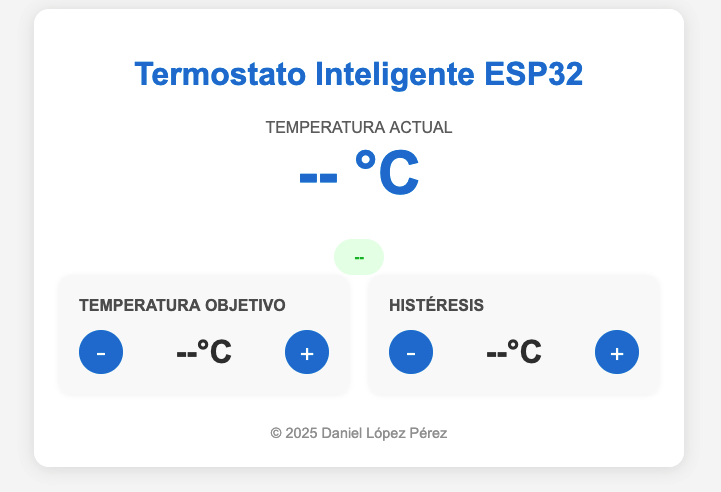
The UI is designed to be clean and intuitive, following a modern “Glassmorphism” aesthetic:
- Real-time Monitoring: The current temperature is displayed prominently, fetching data from the
/dataJSON endpoint every 2 seconds. - Dynamic Controls: Users can adjust the target temperature and hysteresis with a 0.5°C precision using interactive buttons.
- State Indicators: A color-coded status badge (“Heating”, “Cooling”, or “Optimal”) provides immediate context.
Non-Volatile Storage (Preferences)
To ensure the settings persist after a power cycle, I used the Preferences.h library, which interacts with the ESP32’s NVS flash partition.
void guardarEEPROM(const char* clave, float valor) {
    preferences.begin("TEMPERATURAS", false);
    preferences.putFloat(clave, valor);
    preferences.end();
}
Conclusion
This project successfully applied theoretical concepts of signal coding and data transmission in a practical IoT application. The combination of hardware control, wireless communication, and persistent storage makes this a robust prototype for smart home automation

Comments
This blog uses a public mailing list for comments. Any message sent to the list will be publicly visible. You can join the discussion by viewing the archive or replying via email.